.png)
Published
Every CRM starts out clean.
Then people change titles and companies, accounts grow, and new leads arrive with only an email address.
Fixing that by hand is slow work that nobody wants, so it rarely happens. That means that routing, scoring and outreach end up running on records that are out of date or half empty.
That is guide explains how to fix that.
It covers what CRM enrichment is, how to run it and what to look for in a too. It also explains how Amplemarket's new CRM Enrichment keeps your CRM complete and current without anyone updating records by hand.
What is CRM enrichment?
CRM enrichment is the process of adding missing data to the records in your CRM and updating data that has gone out of date. A CRM enrichment tool matches each contact, lead or account to an outside data source and fills fields such as job title, email, phone number, industry and company size.
If you run once, it fills today's gaps. If you run it on a schedule, or as new records are created, it keeps your CRM current.
CRM enrichment vs data enrichment
Data enrichment is the broader term: improving existing data by adding information from a trusted outside source, wherever that data lives. It can run on a CSV list, a web form, a data warehouse or a CRM.
CRM enrichment is data enrichment applied directly to the records in your CRM, so the fields your team routes, scores and sells from stay complete.
Both are different from data cleansing, which fixes errors and duplicates in the data you already have. Cleansing usually comes first and enrichment then fills the gaps that cleanup alone can't.
For a deeper look at enrichment methods, including waterfall enrichment, see our guide to B2B data enrichment tools.
Why CRM enrichment matters
Lead routing, lead scoring, segmentation and territory planning all read from CRM fields. When those fields are empty or wrong, leads go to the wrong rep, scores mislead and campaigns miss the people they were built for.
Enrichment also takes the manual work off reps and RevOps, for instance. Nobody has to look up titles, fix company sizes or chase missing phone numbers before a campaign.
One-time, scheduled or real-time CRM enrichment: which one should you use?
There are three ways to run CRM enrichment, and they solve different problems.
To summarize: one-time enrichment fixes the CRM you have today; scheduled and real-time enrichment keep it that way.
Most teams combine them: real-time enrichment for new records, and a schedule for everything already in the CRM.
In Amplemarket, two settings cover all three. A schedule keeps existing records current, Instant fills in new records within minutes, and a one-time cleanup is a scheduled run you pause once it finishes.
What to look for in a CRM enrichment tool
ZoomInfo, Apollo, Lusha and Clay all offer CRM enrichment, and most tools in the category can enrich new records and refresh existing ones on a schedule. The differences show up in data quality, control and cost.
Here's what you can do with Amplemarket's CRM Enrichment.
Keep your CRM current with Amplemarket's CRM Enrichment
With Amplemarket's CRM Enrichment, you can fill in and refresh your CRM records with Amplemarket data. It runs inside Amplemarket, the same platform your team uses to prospect and run outreach, so there's no second data vendor to manage.
You set it up once, choose which records and fields to update, and it runs on its own.
How Amplemarket's CRM Enrichment works, step by step
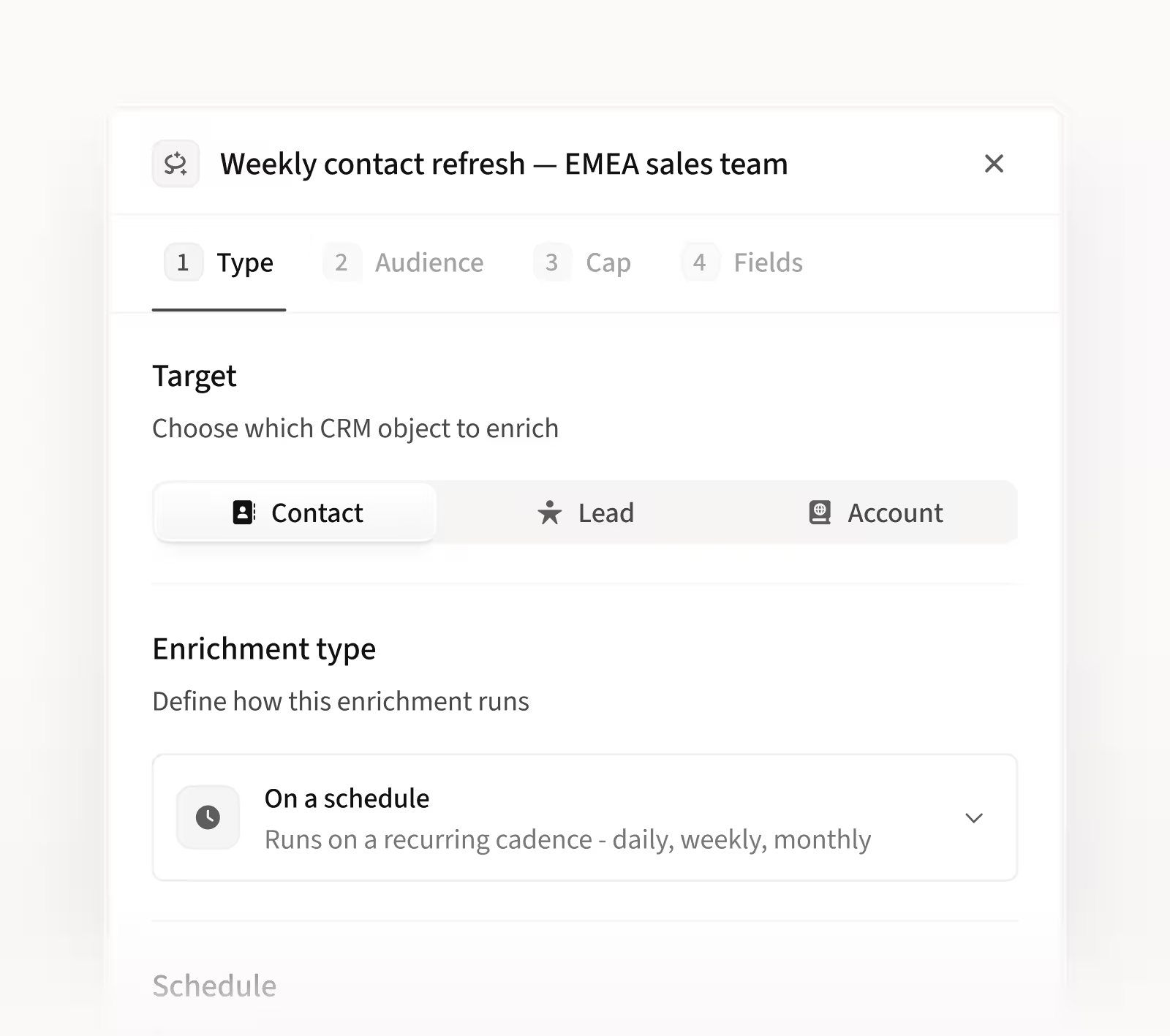
1. Pick the records. Choose contacts, leads or accounts.
2. Choose when it runs. On a schedule, every set number of days, weeks or months, or with Instant, which enriches new records within minutes of being created in your CRM.
3. Narrow the audience. Enrich every record, or filter with Amplemarket filters such as industry or company size and with fields from your own CRM.
4. Pick the fields. Each field follows your CRM integration mapping: replace the current value, or only fill it when it's empty.
5. Check the estimate and set a cap. For scheduled runs, you see how many records match, how many need enrichment and the credits it should use. Set a credit cap per run and an alert, then launch.
What it costs in credits
Company data uses no credits, however many account records you update.
Contact and lead enrichment only uses credits when Amplemarket reveals an email address or a phone number, from the same balance you use for prospecting. Re-checking an email or phone number you already revealed costs nothing.
If a record can't be matched, there's no charge, and credits for a record that fails to update are returned.
What you see after each run
Each run shows how many records were fully enriched, partially enriched or couldn't be enriched, plus the credits used. For every record, you see which fields were enriched, missed or skipped, and you can export the table to CSV.
If a run changes something you didn't expect, you can revert it yourself and Amplemarket puts back the values your CRM had before the run. Credits used by that run aren't returned.
Does CRM Enrichment work with Salesforce?
Yes. CRM Enrichment works with Salesforce and uses your existing Amplemarket Salesforce integration, so it follows the same field mapping and access rules. If Amplemarket isn't allowed to update a field, that field is skipped.
Updates go to Salesforce in bulk rather than one record at a time, so large runs stay light on your API limits.
CRM enrichment inside your sales platform vs a standalone enrichment tool
A standalone enrichment tool sits next to your CRM and your sales platform. That works, but it adds a second contract, a second credit balance and a second integration to maintain.
Do you need a separate enrichment tool if you use a sales platform?
Not if your sales platform already enriches your CRM, as Amplemarket does. A separate tool adds another vendor to manage, and the data in your CRM can drift from the data your reps see when they prospect.
Before your first run
Check that your Salesforce integration is connected and that the fields you want are mapped as default fields. CRM Enrichment can only update default mapped fields.
Make sure whoever sets it up has the CRM Enrichment permission. It's on for admins by default, and admins can turn it on for other roles.
Start with a narrow audience and a credit cap, check the first run's results, then widen it. For a one-time cleanup, pause or archive it once the run finishes, since it can't be set to stop after a number of runs.
Getting started
Want to add CRM Enrichment to your account? Talk to your Amplemarket account team.
Not using Amplemarket yet? Start a free trial or request a demo.