Published
tryacme.com or getacme.com? Picking a secondary domain name feels like a branding decision.
It's an easy choice to overthink, so we let 28.8 million emails answer it instead.
We'll cover which naming patterns and TLDs hold up, which ones to avoid, and what the data can't tell you.
Then we'll get into what matters more than the name: setting up each domain, warming it up, spreading volume, watching every mailbox and keeping your lists clean.
But first, a quick look at why sales teams use secondary domains at all.
Why sales teams use secondary domains
A secondary domain is a separate domain you send outbound from, so your main company domain keeps its reputation. It also adds mailboxes, which adds daily sending capacity.
The biggest risk we see is pushing high volume from a brand new domain too fast. That's the main cause of deliverability failing right away. So our advice to new customers is to start sending from the main domain and warm up the secondary domains in parallel.
Two more rules from our domain setup guide:
- Keep marketing on its own domain. Marketing email can hurt a domain's reputation, and that hits everyone sending from it.
- Run at least two sales domains. It avoids volume spikes, and if one domain has problems, you pause it and keep sending from the other.
Some teams go much further. At Clara, each account executive runs six sending domains. Aline Louzada, Sales Operations Specialist at Clara, put the payoff this way:
"It brings more confidence to the outbound efforts because we know that our domains are secure and our emails are actually being delivered."
Once you know you need them, the next question is what to call them.
How to name your secondary domains
Put your brand in the name and keep it short. Beyond that, most naming choices perform about the same, and a few clearly don't.
Keeping the brand matters because a domain without it looks like it comes from a third party. Two patterns work equally well:
- Your brand on another TLD: acme.co, acme.io
- A short prefix before your brand: tryacme.com, getacme.com, useacme.com
Pick whichever is available and fits your brand. Keep it short and simple: getacme.com, not acmeoutboundsalestool.com.
What the data says about naming patterns
We compared each secondary domain only against other secondary domains in the same workspace, with getacme.com as the 1.00 baseline.
That way a strong team doesn't make its domain names look good.
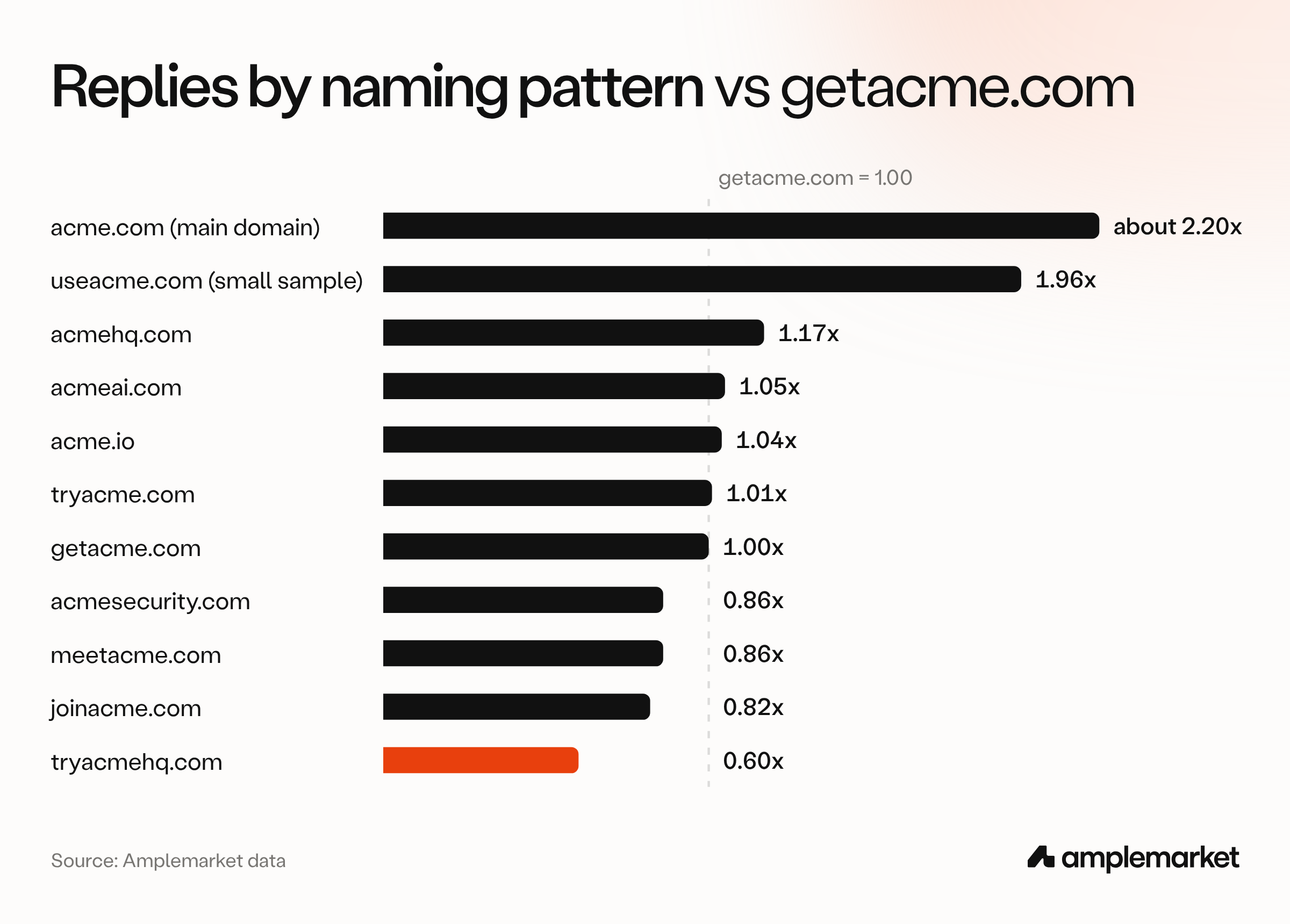
Most of these gaps fall within statistical noise.
The one pattern that's clearly worse is a prefix plus a suffix, like tryacmehq.com. The "join" prefix also trails: those domains get about a quarter of the main domain's replies, against roughly half for "try" and "get".
Which TLD to pick
.com, .co, .io, .net and .org perform about the same. If you're unsure, go with .com, since there's more recognition and trust around it.
We left out the 10 largest senders when scoring TLDs, so a few big teams don't skew the results.
Names to avoid
- Prefix plus suffix. tryacmehq.com and getacmeloans.com are the clearest underperformers.
- "join" and "meet" prefixes. joinacme.com gets fewer replies than other prefixes.
- Misspellings of your brand. acm.com or acmr.com can read as phishing.
- Hyphens, when you have a choice. Hyphenated domains got about 15% fewer replies. The gap is small, so take a hyphen if it's the only option.
When it comes to domain age, once a domain is warmed up and sending, how long you’ve owned it made no clear difference in our data. So buy domains early and spend that time warming them up.
What to expect, and what the data can't tell you
Secondary domains get about half the replies of your main domain, whatever you name them.
So don't pick which domain to send from by its name alone.
Two limits are worth knowing:
- Reply rate reflects both inbox placement and how good the message is, so it isn't a pure deliverability measure.
- Teams don't assign campaigns to domains at random.
Read these results as patterns to avoid, not guarantees.
The name explains 6% of the difference in reply rates, and the team sending explains 74%. That's why the rest of this guide is about how you run your domains.
Set up each domain so it stands on its own
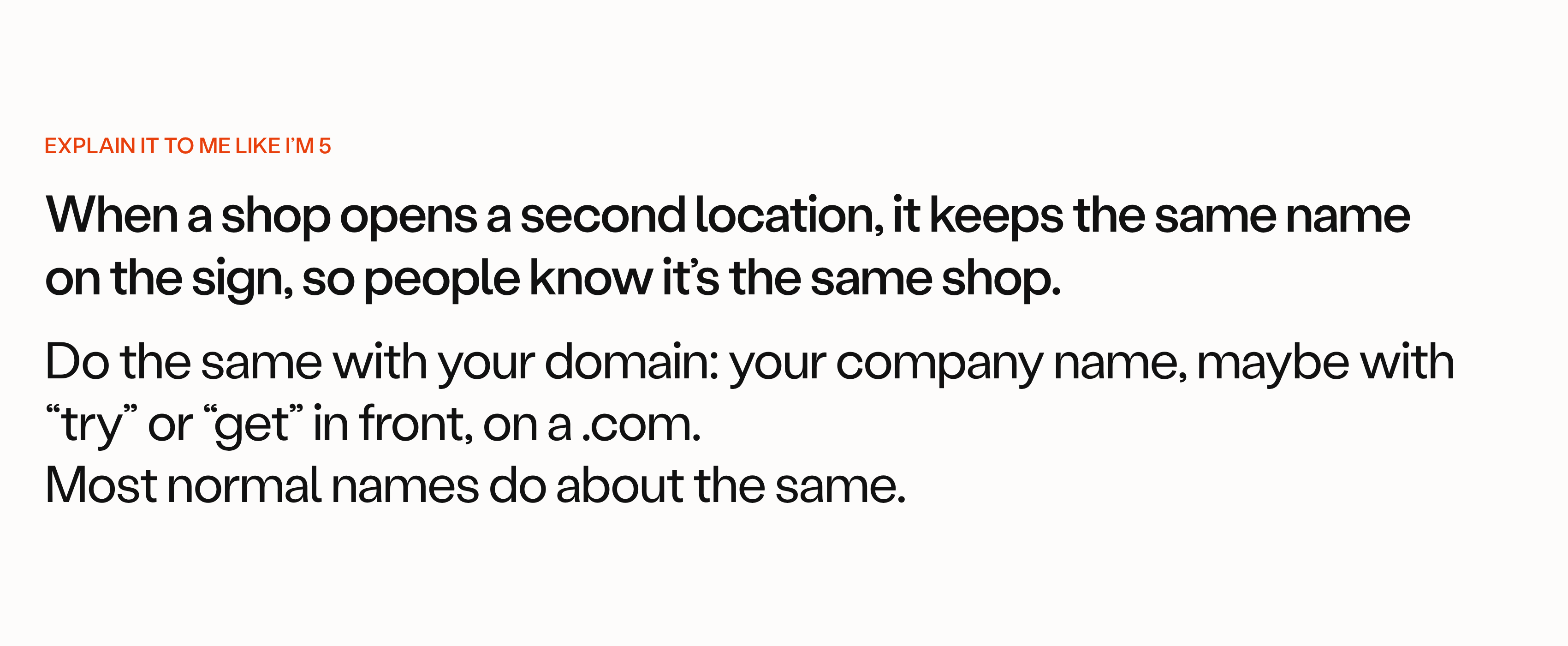
A secondary domain only protects your main domain if it's truly separate. Set it up as an alias or parked domain that redirects to your website.
Two setups look separate but aren't:
- A subdomain like sales.acme.com. Its health is tied to your primary domain.
- Adding the new domain to your primary Google Workspace. It shares the same IP, so you get the same effect as a subdomain.
For buying the domain, Squarespace Domains makes the Google Workspace setup easier. If your team is on Microsoft 365, GoDaddy does the same for that setup.
Then authenticate the domain with SPF, DKIM and DMARC before anything goes out.
For the full technical setup, see our complete guide to email deliverability.
In Amplemarket, the Domain Health Center tracks authentication for every mailbox and domain in one place, so a broken record shows up before it hurts your outreach. Give each sending domain its own custom tracker too, a subdomain like t.getacme.com.
A shared tracker can spread deliverability problems across all your domains, and a separate one per domain lowers that risk. A built-in test confirms each one is set up correctly.
These rules target personal Gmail, Yahoo and Outlook.com inboxes, but they’ve become the baseline every inbox filter expects.
- Gmail asks anyone sending 5,000+ messages a day to set up SPF, DKIM and DMARC, align the From: domain with SPF or DKIM, and keep the spam rate shown in Google Postmaster Tools below 0.3%, ideally under 0.1%.
- Yahoo sets the same 0.3% spam limit.
- And since May 5, 2025, Outlook can send mail from non-compliant domains that send over 5,000 emails a day to Junk or reject it outright.
One warning for Microsoft 365 teams: new mailboxes on a trial can come with low IP reputation, which causes bounces. Ask Outlook support for an exception until you buy the licenses.
A domain that's set up right is still a cold domain, though. It needs warming up.
Warm up before you send
A new domain has no sending history, so mailbox providers don't trust it yet. Warmup builds that history before real prospects see your emails.
This is also where domain age stops mattering. In our data, age made no clear difference once a domain was warmed up and actively sending. The warmup counts, not how long you've owned the domain.
Amplemarket's Deliverability Booster handles this for you. It simulates healthy email activity in a controlled network and raises sending volume gradually over a 12-week plan.
After that, it keeps your sent-to-received ratio balanced while your sequences run. If a mailbox gets flagged, it works to restore healthy engagement, and you can follow its progress in the Domain Health Center.
The point is to start early. Desiree Walters, Manager, Business Development at Revaly:
"Because of the warming capabilities and the behind-the-scenes Amplemarket warm-up emails, we were able to start warming our new mailboxes and our new domains before we actually started using them."
Clara goes a step further and has warmup set up before a new rep's first day.
On G2, Jimmy M., a Senior Account Executive at a mid-market company, made the same point about Gmail:
"The strong automation for outreach, including the ability to 'warm-up' inboxes, is critical for maintaining a good send-to-receive ratio, especially with Gmail account restrictions."
Warm domains are ready to send. How much each one sends is the next decision.
Spread the volume and watch every domain
Spread your sending across several domains and mailboxes instead of pushing one hard. Then check each one every week, because a domain can go from healthy to spam fast.
Rotate across mailboxes
Picture a sequence with 100 leads and two mailboxes. Sending 50 from each on day one is healthier for your domains than sending all 100 from one.
Amplemarket handles this in two places.
When you build a sequence, Mailbox Recommendation uses the weekly inbox placement tests to pick healthy mailboxes. Dynamic Mailbox Rotation then sends from your healthiest mailbox, so a struggling one gets a break instead of more volume.
Replies from every rotated mailbox land in one place, the Unibox, so reps don't juggle inboxes.
On G2, an enterprise reviewer liked that "the tool can switch between email domains to help with deliverability rates". A mid-market reviewer put it more simply:
"Inbox rotation protects my sender reputation so emails actually land."
At Scrut Automation, moving from a single inbox to secondary domains with rotation and built-in warmup changed what the team saw. Sayan Das, Head of Outbound:
"We ran a sort of A/B and figured the emails were hitting the primary inbox. We were receiving responses. Even if it was a no, that still means they were hitting the inbox."
Monitor domain health and inbox placement every week
Problems rarely announce themselves. Katie Penner, Head of Sender Relations at Sendoso, saw it when the team briefly moved to another platform: "It was like flipping a switch. One day we had healthy pipeline. The next, we were going straight to spam."
And after they switched back:
"As soon as we got back on Amplemarket, our inbox placement and reply rates rebounded. It was night and day."
Three checks catch this early:
- Domain Health Center. One view of every mailbox and domain, covering authentication, spam tests, inbox-to-outbox ratios and warmup.
- Weekly inbox placement tests. They run automatically across all connected mailboxes and mark any mailbox that lands in spam as unhealthy, so you don't send from it. It's cleared once it passes a later test.
- Alerts. Notification Center flags a disconnected mailbox or a warmup or deliverability problem.
To see how these checks compare across tools, read our guide to the best email deliverability tools.
Paul Conway, Head of Sales and BD at SpendLab, described what happens without that visibility: "Our domain health was so poor, they probably would have never gotten through to the people."
Monitoring tells you a domain is in trouble. Clean lists keep it out of trouble in the first place.
Protect your domains with clean lists
Every bounce and spam complaint counts against the domain that sent it. So the simplest deliverability fix is not emailing bad addresses in the first place.
Email Validation checks each address before you send, catching fake, disposable and misspelled ones and flagging any it can't verify.
Amplemarket has a bounce rate under 3%.
The second fix is to stop contacting anyone who has already bounced or marked you as spam. Clara built a team-wide workflow for exactly that. In Aline Louzada's words:
"Every time an email bounces or hits the spam folder, we automatically send the lead to the exclusion list."
Before that, the team had nearly given up: "We had bad bounce and spam rates before, and we were like, 'Okay, I think that's it. We cannot change anything. I think that's the way it is.'"
With Amplemarket, Clara also reports a 1.7% bounce rate, roughly 10x lower than with its previous tool.
Teams that switched tools see the same thing in their bounce numbers. Mariana Guerci, Product Growth at Albato, tested both side by side:
"We saw very different results from the data and emails we ran through them. The bounce rate was much higher for Apollo, so the data quality and deliverability was clearly much better with Amplemarket."
On G2, Juan C., a team leader at a mid-market company, shared what changed after migrating:
"We come from apollo.io, and the difference is tremendous. Our spam and bounce numbers went down like crazy after we migrated."
A good name gets you a fair start, but clean lists are what keep the domain worth sending from.
How we ran the analysis
We analyzed 28.8 million sequence emails sent from Amplemarket workspaces in 2025 and 2026, and labeled each sending domain by how its name relates to the brand.
Sorting domains by raw reply rate would mislead, because the team sending explains 74% of the differences. So we used a Poisson regression with a fixed effect per workspace, comparing each secondary domain only with other secondary domains in the same workspace.
TLD scores exclude the 10 largest senders.
Sources
- How to name your secondary domains, Amplemarket knowledge base
- About setting up a new domain, Amplemarket knowledge base
- About custom trackers, Amplemarket knowledge base
- Customer stories: Clara, Revaly, Scrut Automation, Sendoso, SpendLab, Albato
- Amplemarket reviews on G2
- Product pages: Domain Health Center, Deliverability Booster, Inbox placement tests, Email Validation, Mailbox Recommendation
- Made for you, December 2024 (Dynamic Mailbox Rotation)
- Amplemarket University: account setup and mailboxes