Published
A prospect replies interested to your cold email. You know what should happen next.
Pause the other sequences running to that account.
Check if they're a strategic tier.
Maybe loop in the senior AE. Log the activity in the CRM.
But you're already running 3 other sequences. Your calendar is full.
By the time you get to the right follow-up, 2 days have passed and the moment is gone.
This happens every day in outbound teams.
Not because reps don't know what to do. They know exactly what to do.
The problem is doing it consistently, across every lead, every day, when the manual work keeps stacking up.
Sales orchestration solves this.
It's the layer that connects signals (something happened) to outcomes (something should happen next) across your sales stack.
When a meeting is booked, a workflow kicks in automatically.
When a contact replies, the right action fires without anyone remembering to do it.
This guide covers what orchestration is, why it's different from basic automation, and walks through 4 real outbound sales workflows you can build in any platform that supports them.
We'll use examples from Amplemarket Workflows, but the patterns work anywhere.
What is sales orchestration?
Sales orchestration is the coordinated execution of sales activities across multiple channels and systems.
Prospecting, sequencing, follow-ups, CRM updates, routing. All driven by signals, rules, and branching logic, without anyone having to kick off each step manually.
Where sequencing automates linear outreach (email 1 on day 1, email 2 on day 3, email 3 on day 7), orchestration automates decisions:
- If the buyer responds, branch here.
- If they don't, wait and check their CRM status.
- If the account is strategic, route to a human SDR.
- Otherwise, continue with automated follow-up.
Think of it as the operating system on top of your sales stack. It turns a collection of tools into a coherent, responsive outbound motion.
Workflow vs sequence, quick distinction: A sequence is a linear series of outreach steps.
A workflow is the orchestration layer that decides when to start a sequence, which one to use, when to pause, and what happens after a reply. Sequences are ingredients. Workflows are the recipe.
Sales orchestration vs sales automation
This is one of the most common questions in the space, and the answer matters when you're evaluating tools.
Sales automation handles individual, repeatable tasks:
- Send an email when a form is submitted.
- Update a CRM field when a stage changes.
- Add a contact to a sequence.
Sales orchestration coordinates multiple tasks with branching decisions based on context:
- If a contact replies interested AND the account is a strategic tier, remove all other contacts from sequences and drop them into a personalized executive outreach sequence.
- If the account is not strategic, just remove contacts from outbound sequences and let the owning rep take over.
Where AI fits in: AI is a component inside orchestration. It adds reasoning and personalization to specific actions.
It doesn't replace orchestration itself. You can have orchestration without AI (rule-based logic).
You shouldn't have AI without orchestration (raw AI output with no context is just noise).
The mental model:
Automation = doing one thing reliably.
Orchestration = deciding what should happen next, based on context.
AI = making individual actions smarter, inside orchestration.
Why most sales teams still operate manually in 2026
Even with dozens of sales automation platforms available, most outbound teams still handle repetitive work manually.
Three reasons keep coming up.
Logic lives in people's heads
Sales managers know which leads should go to which rep. They know when to pause a sequence, how to handle an interested reply, when to escalate, when to wait. But this tribal knowledge never gets codified.
When reps leave, the knowledge leaves with them. When the team grows, the process gets inconsistent.
The tech stack is fragmented
A HubSpot study found 50% of sales teams feel overwhelmed by the number of tools they use. In a typical outbound stack, sequencing lives in one tool, data in another, calls in a third, CRM updates in a fourth, AI personalization in a fifth.
Coordinating across them takes manual handoffs, or a platform that already connects them.
The default path is manual
Setting up a workflow takes activation energy. It's often faster today to handle one task manually than to spend 20 minutes building a workflow.
Even if that workflow would save 10 hours a week later.
Teams pick the short-term cost every time.
The teams that break out of this pattern aren't the ones with more tools. They're the ones that codify their manual logic into orchestrated workflows, one at a time.
The WHEN / WHO / WHAT framework
Every outbound sales workflow, no matter how complex, fits this three-part pattern.
WHEN is the trigger that starts the workflow. Common triggers:
- A meeting is booked.
- An email reply is marked interested.
- A social message gets a reply.
- A call is logged with a specific disposition.
- A CRM field is updated.
- A sequence completes without a reply.
- An account's closed-lost date crosses a threshold, like 90 days ago.
On CRM triggers: A powerful trigger type is "CRM field changed to value X." This needs bi-directional CRM sync in your automation platform. Read-only integrations can't detect field changes in real time.
When you're evaluating platforms, confirm that CRM updates can actually start workflows, not just record outcomes.
WHO is the set of filters that decide if the workflow should run for this specific lead or account:
- Lead attributes: industry, seniority, geography, job function.
- Account attributes: revenue range, employee count, account tier.
- CRM-based filters: deal stage, lifecycle stage, custom field values.
- Exclusion rules: not a customer, not in an excluded industry, not a competitor.
WHAT is the actions the workflow performs:
- Add to a sequence.
- Send a message on a specific channel.
- Wait a defined period.
- Check a condition and branch the path.
- Update a CRM field.
- Assign a task to a specific user.
- Trigger a webhook to an external system.
You'll see this three-part structure repeated in every example below.
Once you internalize the framework, designing new workflows becomes a matter of filling in the three blanks.
Prefer to watch the 4 examples built live? Here's the full walkthrough.
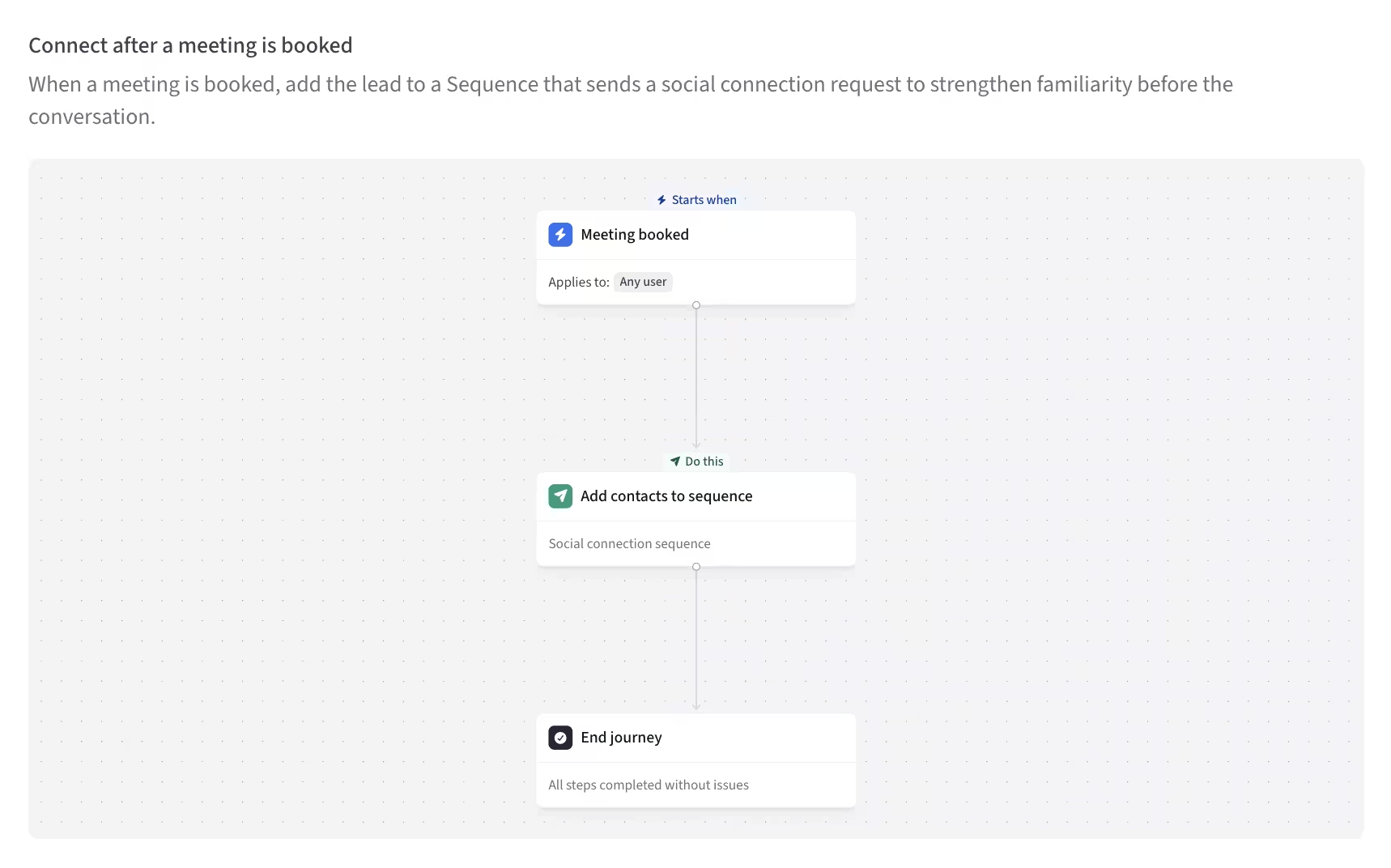
Use Case 1: Post-meeting social connection follow-up
What it solves: Reps forget to send a social connection request after a meeting is booked. The relationship-building signal goes cold. Over dozens of meetings a quarter, this compounds into a real gap in relationship depth.
It's not a make-or-break workflow. But it's the easiest one to start with. A perfect first automation while you're still learning the platform.
The build:
WHEN: A meeting is booked with a contact I own (via calendar integration or booking-platform trigger).
WHO:
- Account type is Prospect (CRM filter, excludes existing customers and partners).
- Contact is not already connected on our primary social channel.
WHAT:
- Wait 1 day. Don't send the connection request immediately. It feels robotic.
- Send a personalized social connection request with a short, context-aware note.
- Wait 2 days.
- If the connection is accepted, send a thoughtful first message.
- Update CRM field: "Social connection outreach, completed."
- Exit workflow.
When to use it: Best for AE-owned pipeline where relationship depth matters. Less valuable for high-velocity SDR outbound where meetings are numerous and relationships are transactional.
Variations:
- Add a branch on meeting outcome. If it was held, send a stronger follow-up. If it was a no-show, send a gentle reconnect.
- Add a notification to the manager if the account is a strategic tier.
- Add a delay-and-check. If the connection isn't accepted within 7 days, remove from the workflow so you don't appear pushy.
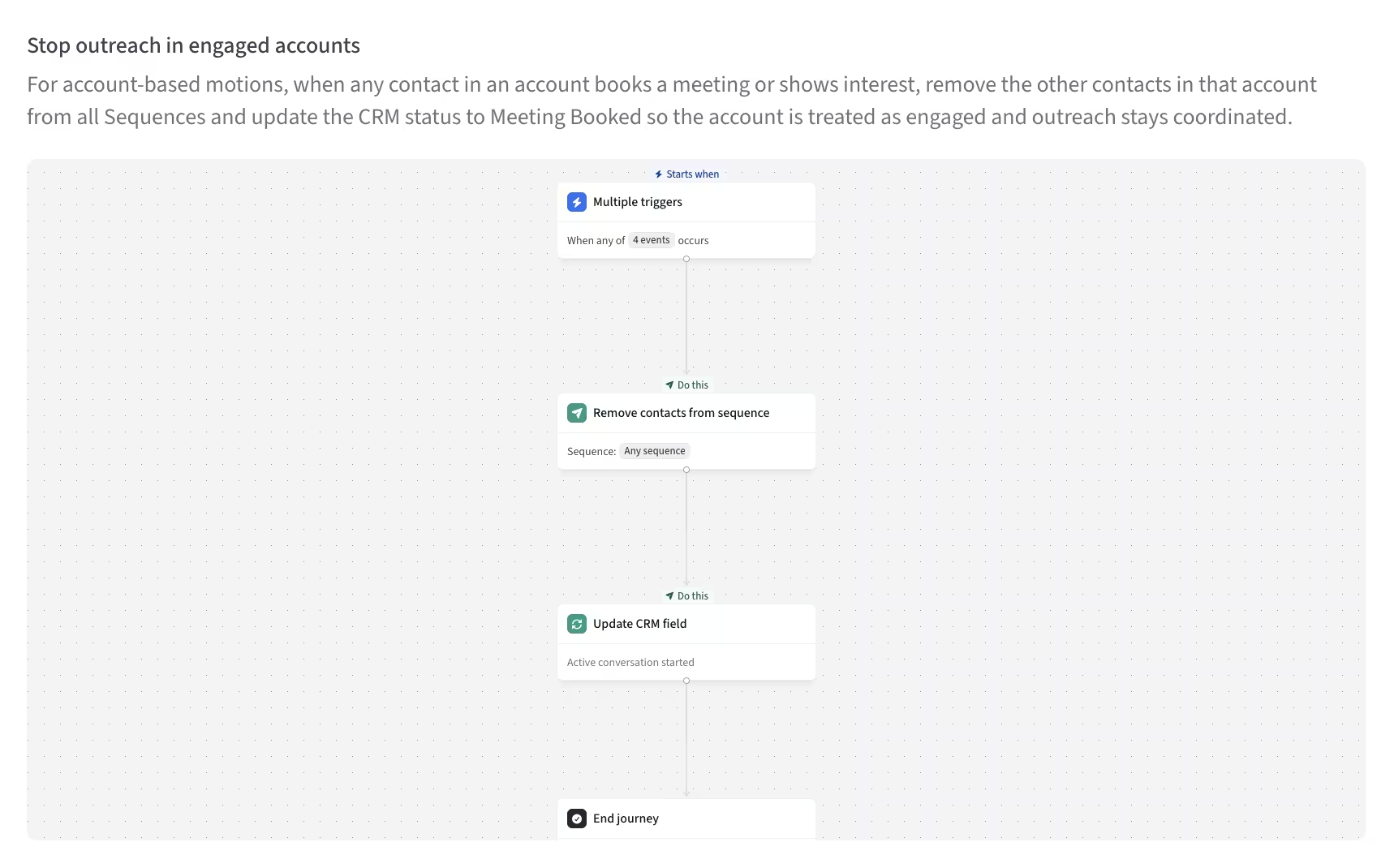
Use Case 2: Account-level coordination when someone shows interest
What it solves: A contact at one of your target accounts replies interested.
But three other reps on your team are still running outbound sequences to different contacts at the same account.
The account gets hit with a flood of uncoordinated outreach at the exact moment they're signaling interest. It's unprofessional, it burns goodwill, and it puts the opportunity at risk.
This is one of the highest-ROI workflows you can build if you run account-based outbound.
On account-level targeting: Not all sales automation platforms support account-level actions. Most default to contact-level, meaning workflows only affect the individual contact who triggered them.
Account-level targeting, where a workflow acts on every contact at the same account, is a meaningful differentiator when you're evaluating tools. If you run account-based outbound, this should be a non-negotiable capability.
The build:
WHEN: ANY of these signals fire for a contact:
- Meeting booked.
- Email reply marked interested.
- Social message reply marked interested.
- Call logged with disposition interested.
WHO: Target ALL contacts at the same account, not just the one who replied.
Why this matters. The default behavior in most platforms is to act on the specific contact who replied. Here, you want the workflow to act on every contact at the entire account. That's how you coordinate the team-wide response.
WHAT:
- Branch on account strategic tier:
- If strategic account (revenue above $10M, or an explicit strategic flag):
- Remove all contacts from active outbound sequences.
- Drop them into an executive outreach sequence.
- The executive sequence uses AI Smart Snippets that read the account's CRM context (industry, recent news, deal history) to personalize opening paragraphs automatically.
- Notify the account owner via email and a CRM task.
- If not strategic:
- Remove all contacts from outbound sequences.
- No further automated action. Let the owning rep take over manually.
- If strategic account (revenue above $10M, or an explicit strategic flag):
- Update CRM field: "Account status: Active conversation started."
- Exit workflow.
When to use it: Any outbound motion where multiple reps can touch the same account. Essential for enterprise and mid-market teams running account-based outbound.
Variations:
- Branch on deal stage. If a deal already exists, route differently.
- Branch on contact seniority. If the reply came from a VP or above, escalate to an AE immediately.
- Add a 24-hour delay before the executive sequence starts, giving the account owner time to review.
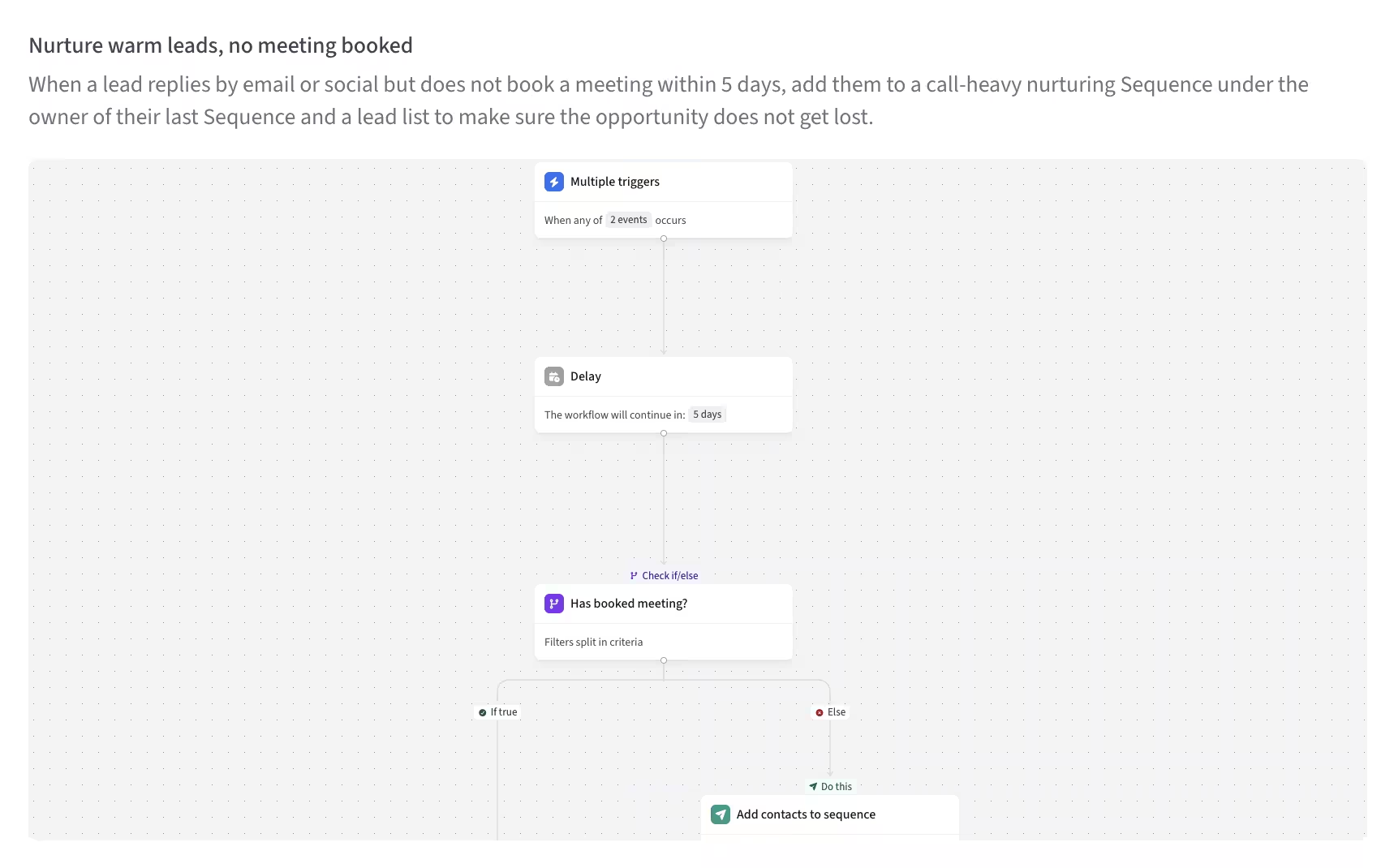
Use Case 3: Interested reply without a meeting booked (3-day branching follow-up)
What it solves: A prospect replies "yes, I'm interested" but then never books a meeting. This is one of the most common silent-killers in outbound pipeline. The interest is real. But momentum dies in the gap between reply and calendar booking.
Most teams lose these. A 3-day branching follow-up workflow recovers a meaningful percentage of them.
The build:
WHEN: An email reply or social reply is marked interested.
WHO: No initial filter. We'll check conditions later in the workflow.
WHAT:
- Wait 3 days.
- Check: Has a meeting been booked in this period?
- If yes: Exit workflow. Goal achieved. Don't interrupt momentum.
- If no: Continue to segment check.
- Check go-to-market segment:
- If enterprise (company revenue above $10M):
- Assign a task to a human SDR to follow up personally with a phone call.
- Notify the account owner via email.
- Update CRM: "Enterprise handoff initiated."
- If SMB or mid-market:
- Drop into an automated 4-step follow-up sequence.
- Each step embeds a calendar-booking link.
- After step 4, if there's still no meeting, mark the lead "interested-cold" and exit.
- If enterprise (company revenue above $10M):
- Exit workflow.
When to use it: Any outbound team running reply-based qualification. Especially valuable when SDR capacity is constrained. The automated path captures SMB opportunities while the human path preserves enterprise relationships.
Variations:
- Different wait times. 7 days for enterprise (they take longer). 3 days for SMB.
- Different handoff logic. AE vs SDR based on deal size potential.
- Add an intent signal check. If the prospect visits your pricing page during the 3-day window, accelerate the workflow immediately.
Use Case 4: Closed-lost account revival with AI context
What it solves: Deals lost 90+ days ago have rich context in your CRM. The closed-lost reason. The deal notes.
The competitor they chose. The budget situation. Most revival outreach ignores all of that and sends a generic "just checking in" email. Conversion is predictably low.
A workflow that reads the closed-lost reason and branches to the right revival message, with AI-personalized context from the CRM, can multiply win-back rates.
The build:
WHEN: An account's closed-lost date equals exactly 90 days ago (time-based trigger, evaluated daily).
WHO:
- Primary contact only (CRM filter by contact role: "Primary" or "Economic Buyer").
- Account is not currently in any active outbound sequence.
- Account has not opened any competitor news alerts in the past 30 days (exclusion).
WHAT:
- Branch on closed-lost reason (CRM field):
- Reason = "Budget":
- Drop into a "Pricing update" revival sequence.
- First email highlights any new pricing tiers, discounts, or budget-friendly plans released since the lost deal.
- Reason = "Timing":
- Drop into a "New features since we last spoke" sequence.
- Opening paragraph (via AI Smart Snippet) summarizes major product updates since the closed-lost date.
- Reason = "Competitor":
- Drop into a "Competitor comparison and customer win-back" sequence.
- Includes a customer case study of someone who switched from that specific competitor.
- Reason = "Other" or unknown:
- Drop into a generic check-in sequence.
- AI Smart Snippet pulls whatever context is available from CRM (deal notes, last rep interaction) to personalize the opening.
- Reason = "Budget":
- After the sequence completes (regardless of branch):
- Update CRM: "Revival attempt, completed [date]."
- If a reply is received, route to the original account owner.
- Exit workflow.
When to use it: Any team with a CRM that captures closed-lost reasons systematically. Even better if your product has evolved significantly since the deal closed.
Variations:
- Trigger at different intervals. 90 days is a starting point. Test 180 and 365-day variants for different segments.
- Combine with intent signals. If the prospect is visiting your pricing page again, trigger immediately instead of waiting for the time threshold.
- Branch on account health. If the company has grown significantly since the close (new funding, new leadership), prioritize them higher in the sequence.
A note on multichannel orchestration
The best orchestration platforms coordinate actions across email, phone, social, SMS, WhatsApp, and video inside a single workflow. Single-channel orchestration (email-only, for example) is typical of older generation sales automation tools.
Modern platforms treat multichannel as native.
A single workflow can send an email, wait for a response, escalate to a phone call, and follow up on social, all as part of one orchestrated flow.
When you're evaluating a sales automation platform, ask this specifically: can a single workflow take action on multiple channels, or do you need a separate workflow per channel?
The answer tells you whether the platform was built for multichannel orchestration from the ground up, or retrofitted later.
How to get started with sales orchestration
The temptation with orchestration is to automate everything at once. Don't. Roll it out deliberately.
Step 1. Map your top 5 manual sales activities that repeat weekly
Get specific. "Following up on interested replies" is too vague. "When a prospect replies interested within 48 hours of my first email, send a follow-up with my calendar booking link and update CRM stage to MQL" is actionable.
Step 2. For each activity, write out the WHEN / WHO / WHAT pattern
Use this sentence structure: "WHEN [trigger], FOR [filter], DO [actions]." If you can't fit the activity into this structure, it probably isn't a good automation candidate. It might need too much human judgment.
Step 3. Start with the simplest workflow
The post-meeting social follow-up (Use Case 1 above) is the perfect starter. It's contained, low-risk, and gives you a quick win.
Step 4. Build, test, monitor for 2 weeks
Don't expand until you've validated that the first workflow runs correctly. Watch for edge cases, errors, unexpected outcomes. Iterate.
How long does this actually take?
Simple workflows like the post-meeting follow-up can be built in under 15 minutes on a visual workflow platform. Complex workflows with branching logic and AI personalization take 30 to 60 minutes. The bigger investment isn't the setup. It's the ongoing iteration as your sales process evolves. Budget 2 to 3 hours a month to refine your top workflows based on what's happening in real sales conversations.
Step 5. Add the next workflow
Once the first is stable, move to the next priority from your list. Repeat.
By month 3, you'll have 5 to 8 orchestrated workflows running in the background while your team focuses on the work that actually needs human judgment.
When orchestration isn't the right answer
Not every sales activity should be automated. Being honest about this matters more than aggressive "automate everything" messaging.
If your sales process isn't defined yet. Automating a bad process amplifies the mess. Define the workflow manually first, get it working, then codify.
If your CRM data is dirty. Workflows only work with the context your CRM provides. If your deal stages aren't consistent, your custom fields are incomplete, or your account ownership is unclear, fix the data layer first.
If your team size is under 3 reps. Manual coordination is often fine at that scale. Automation makes sense when the same activity happens across many reps, many accounts, many times a week.
If the workflow touches complex judgment calls. Don't automate "is this opportunity worth pursuing?" That's a human call. Automate "once the human decides yes, what happens next?"
If regulatory or compliance complexity is high. Financial services, healthcare, and some regulated industries have requirements that make fully automated outreach risky. Build workflows with human approval gates where needed.
Ready to build these workflows?
You've seen the framework and the four highest-impact workflows. Here's what to do next.
Watch the full walkthrough. We built all four of these workflows live in under 30 minutes. Watch the video
Try it yourself. Amplemarket Workflows lets you build every workflow in this guide using a visual canvas, with AI Smart Snippets and full CRM integration. Learn more or book a demo.
Related reading: Introducing Amplemarket Workflows — the launch announcement with the full context on why we built this product.