
Published
June was about giving reps and agents more control across every surface they touch, from the extension to MCP to the sequences and workflows they build every day.
Here's what's new:
Build Workflows with a prompt
Describe the workflow you want in natural language and let AI build it for you. The generated workflow opens in the normal editor, so you can review, adjust, and launch when ready.
How this helps you:
- Skip the setup work by describing the workflow you want and letting AI build the draft
- Migrate faster from other tools by recreating existing workflows in plain language
- See upfront what's supported and what isn't before the draft is created

A smarter extension: notes, tasks, and activity filters, all in place
The extension now handles more of your daily work end to end. Add and edit notes, create and execute tasks, and filter the activity feed, all without leaving the page you're on.
Create, view, and edit notes without switching to the platform. The action menu adapts based on the active tab, so note creation is always the first action when you're in the Notes tab.
Create tasks from the action bar and execute them from the Activity Feed, with the same actions you already know from the platform. Works across all extension surfaces.
Activity filters are now also available directly in the extension, matching the same experience you already have on contact and account pages in the platform. Filter by activity type in place, no scrolling and no redirects.
How this helps you:
- Cut context switching by handling notes, tasks, and activity filters right in the extension
- Keep the same experience across the extension and the platform
- Stay focused on the page you're on, whether that's LinkedIn, your CRM, or Gmail

MCP upgrades: Unibox triage, personas, lead management, and more
MCP is now able to read and triage your Unibox, use existing personas in searches, update lead data, remove leads, and inspect leads enrolled in sequences, all from your AI agent.
Agents can list and read inbox threads (email and LinkedIn) and outbox entries, filter by status, sequence, user, or date range, and pair with tools like Slack for fully automated triage pipelines.
Additionally, a new set of MCP tools gives agents full control over sequences and leads: use existing Amplemarket personas directly in MCP searches, update per-lead dynamic field values, remove leads from a sequence, and list or inspect enrolled leads with filters for status and more.
How this helps you:
- Automate inbox triage end to end without session hacks or browser workarounds
- Reference saved Amplemarket personas in MCP searches instead of rebuilding filters
- Manage enrolled leads without ever leaving your AI agent

Fathom and Attention integrations bring meeting context into Amplemarket
Meeting enrichments from Fathom and Attention now flow directly into Amplemarket. Connect either via API key, see enriched meetings in the activity feed, and get richer AI-powered Account Insights on every account.
How this helps you:
- Bring meeting context directly into Amplemarket without switching tabs
- See at a glance which meetings have been enriched from the activity feed
- Get richer AI-powered Account Insights that include what was actually said on the call

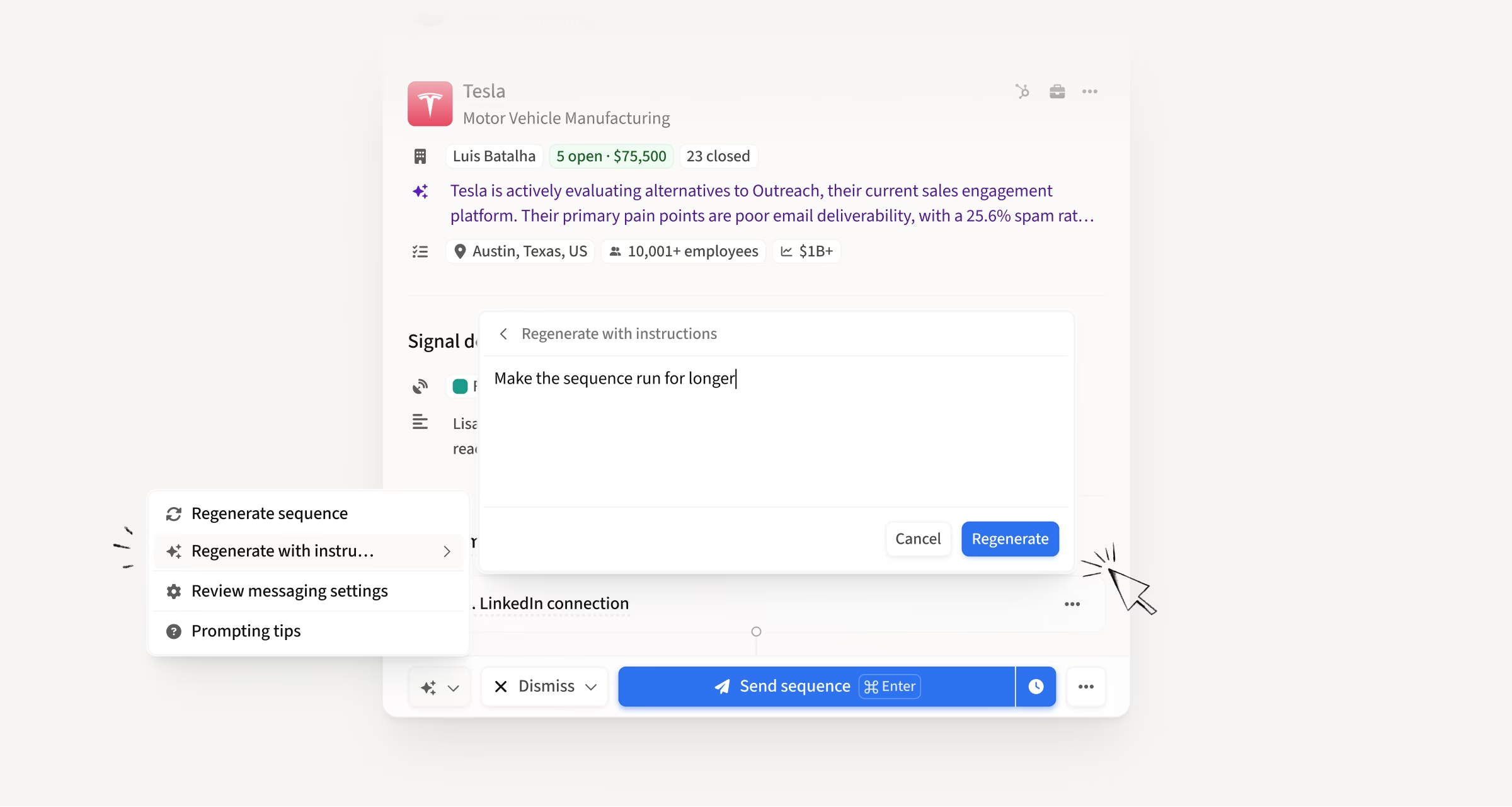
Regenerate Duo Sequences with custom feedback
You can now regenerate any Duo Sequence with custom instructions. Tell Duo what you want ("be less formal," "lead with a mutual connection," "shorten this and keep only a connection request plus a LinkedIn message"), and it re-incorporates that feedback into the whole sequence. Feedback is sticky per sequence, and you can revert to the original at any point.
How this helps you:
- Nudge a single sequence in a specific direction without leaving the recommendation
- Keep iterating without repeating yourself thanks to sticky per-sequence feedback
- Revert to the original sequence anytime you want to start fresh
Use Amplemarket templates and dynamic fields directly in Gmail
Amplemarket templates and dynamic fields are now accessible directly from the Gmail compose window. Insert a template in one click, dynamic fields resolve inline, and unresolved fields are highlighted so nothing slips through.
How this helps you:
- Run 1:1 outreach from Gmail without switching to the platform
- Insert templates in one click with dynamic fields resolved inline
- Catch missing fields before you send with automatic highlighting

Remove a contact from all sequences with a single call disposition
A new call disposition action removes a contact from all sequences in one step, instead of just the current one. Works whether the disposition comes from a sequence call task or an ad-hoc/inbound call.
How this helps you:
- Stop outreach across every sequence with a single call disposition
- Skip tracking a contact down in each sequence to remove them by hand
- Cover ad-hoc and inbound calls too, including those from Nooks and Orum
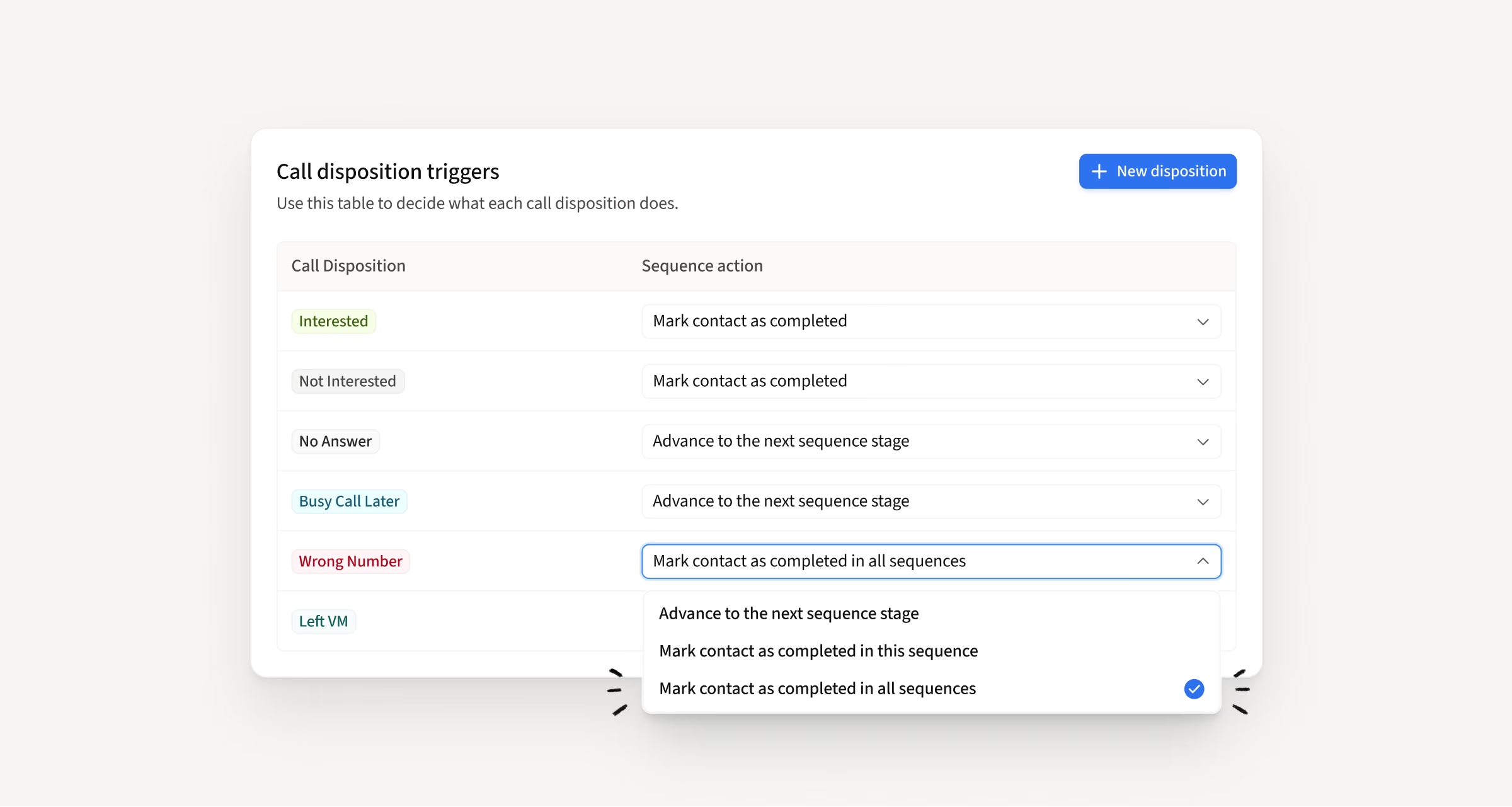
Auto-flag wrong numbers from any dialer with a disposition
Logging a Wrong Number disposition now flags the dialed number automatically, across the native dialer, CRM Dialer (Salesforce and HubSpot), and third-party dialers via the public Calls API. The is_wrong_number and DNC status are now exposed on public API phone numbers, so integrations can skip bad numbers instead of dialing them.
How this helps you:
- Flag bad numbers directly from your disposition without opening the contact page
- Keep dead numbers from coming back on the next task
- Feed wrong-number status into integrations that read from Amplemarket
Choose the right number to reach on WhatsApp, iMessage, and SMS
When a lead has multiple phone numbers, you can now pick which one to message via WhatsApp, iMessage, or SMS. The deep link reflects your selection instead of defaulting to a single number.
How this helps you:
- Reach leads on the right number for the right channel
- Skip the default behavior when it's not the number you want to use
- Keep phone number selection consistent with what you'd expect elsewhere

Cleaner CRM-connected dialing with the Nooks integration
The Nooks integration now has better sync visibility, cleaner sequence handling, and richer context inside Nooks itself. A few things shipped together:
- Sync status now shows on the Tasks page with icons, failure reasons, and filters for synced vs. not-synced
- Tasks without a phone number now sync and auto-expire after a few days, so reps can still try
- Ad-hoc tasks from high opens are now tied to the sequence, so a not-interested disposition ends the sequence and cancels the tasks
- The Amplemarket extension now lives inside Nooks, so previous activity, notes, and enrichment follow the lead as you dial
- Rate-limiting on contacts pushed per user prevents blowing through CRM API limits
How this helps you:
- See exactly which tasks synced across Amplemarket, your CRM, and Nooks
- Stop dialing contacts who already left a sequence
- Get Amplemarket context right inside Nooks as you call

Insert email templates directly from the UTV
You can now browse and insert templates directly from the UTV composer in email stages, even if the sequence stage wasn't linked to a template. Preview any template before inserting it.
How this helps you:
- Pick the right template at execution time based on the context in front of you
- Preview templates before inserting to make sure you're picking the right one
- Skip the copy-paste workaround for using templates in one-off sends

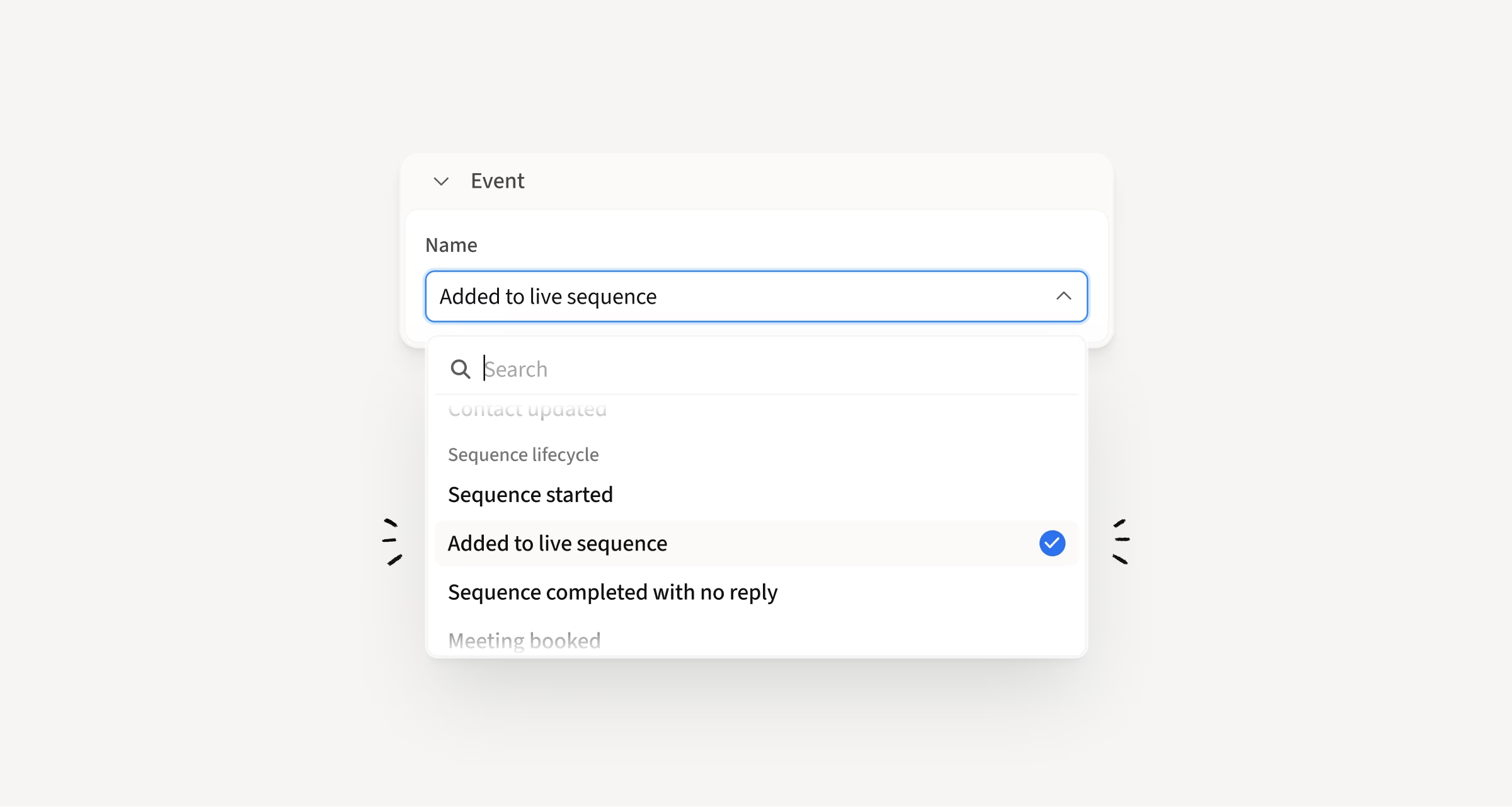
New "Added to Live Sequence" trigger in Workflows
A new Workflows trigger under Sequence Lifecycle runs the moment a lead is successfully added to a live sequence, before it's scheduled into the first stage. This gives you a more precise starting point for automations that should happen right after enrollment.
How this helps you:
- Kick off automations the moment a lead enters a sequence, not when it's scheduled
- Update CRM fields, move leads out of "needs action" views, or add leads to lists immediately
- Get better visibility into the time between enrollment, scheduling, and first touch
Click any person in Searcher to see their full details
Clicking a person in Searcher now opens an inline drawer with their full details, just like clicking a company already worked. Works for both contacts and non-contacts.
How this helps you:
- See the full context on any person without leaving Searcher
- Get the same details you already know from the extension or contact page
- Keep Searcher clean and scannable while deeper context lives in the drawer

Hope these updates make your experience with Amplemarket even better!
Have feedback? Submit it here
Questions? You can always reach out to support@amplemarket.com