
Published
What happens when your AI assistant can access your sales data?
Most conversations about MCP focus on sales reps sending cold emails faster.
That's valid. But it's a fraction of what's possible.
I'm a MarTech consultant and fractional CMO. I work with B2B startups, cybersecurity companies, and mid-size organizations that have invested in tools but aren't getting results from them.
My job is to connect the dots between systems, data, budgets, and people, and make the marketing actually produce revenue.
Since Amplemarket launched MCP integration with Claude and ChatGPT, the way I deliver value to clients has changed.
I don't come to add more tools.
I connect the MarTech tools they already have.
Here's what that shift looks like, from the perspective of someone who optimizes marketing operations for a living.
But first, let’s start with the basics.
What is MCP?
MCP stands for Model Context Protocol. It is an open standard that lets AI assistants connect securely to external tools and data sources. Instead of copying and pasting information between platforms, the AI can query those tools directly inside a single conversation.
What is Amplemarket MCP?
Amplemarket MCP is a connection between Amplemarket's AI sales platform and AI assistants like Claude and ChatGPT, built on the Model Context Protocol standard.
It lets you search for prospects, enrich contacts, check previous touchpoints, and build lead lists inside an AI conversation, without switching tabs or manually transferring data.
Why should marketing teams care about MCP?
Marketing workflows that consume the most time, such as prospect research, list building, competitive analysis, and event prep, are exactly the ones MCP collapses from hours to minutes.
Before MCP, using AI for outbound meant copying data between tabs.
With MCP, the AI talks directly to your Amplemarket account.
One conversation. No tab switching. No copy-pasting.
Tip: MCP doesn’t replace your strategy. It accelerates execution. The quality of what you get out depends entirely on how specific your prompts are.
Generic input produces generic output.
How I use Amplemarket MCP with my clients every day
Pre-meeting research: from 25 minutes to 60 seconds
Every discovery call I take starts with research. Before MCP, the routine was always the same: LinkedIn for the person, Crunchbase for the company, Google for recent news, HubSpot for previous touchpoints. Twenty-five minutes, minimum.
Now I type one prompt:
“I have a discovery call in 30 minutes with [domain]. Tell me everything: industry, company size, funding, tech stack. Enrich [email] -- role, seniority, how long they’ve been there. Check if we’ve had any previous touchpoints. Then give me the 3 most important things to know and suggest 2 discovery questions.”Claude returns a full briefing in under a minute. Company profile, contact details, previous interactions, and AI-generated questions based on real data from Amplemarket.
I recently used this before a call with a cybersecurity company that had just hired a new VP Marketing. Claude flagged that the company uses both HubSpot and Salesforce, which, in my experience, almost always means integration issues.
That insight shaped the entire conversation.
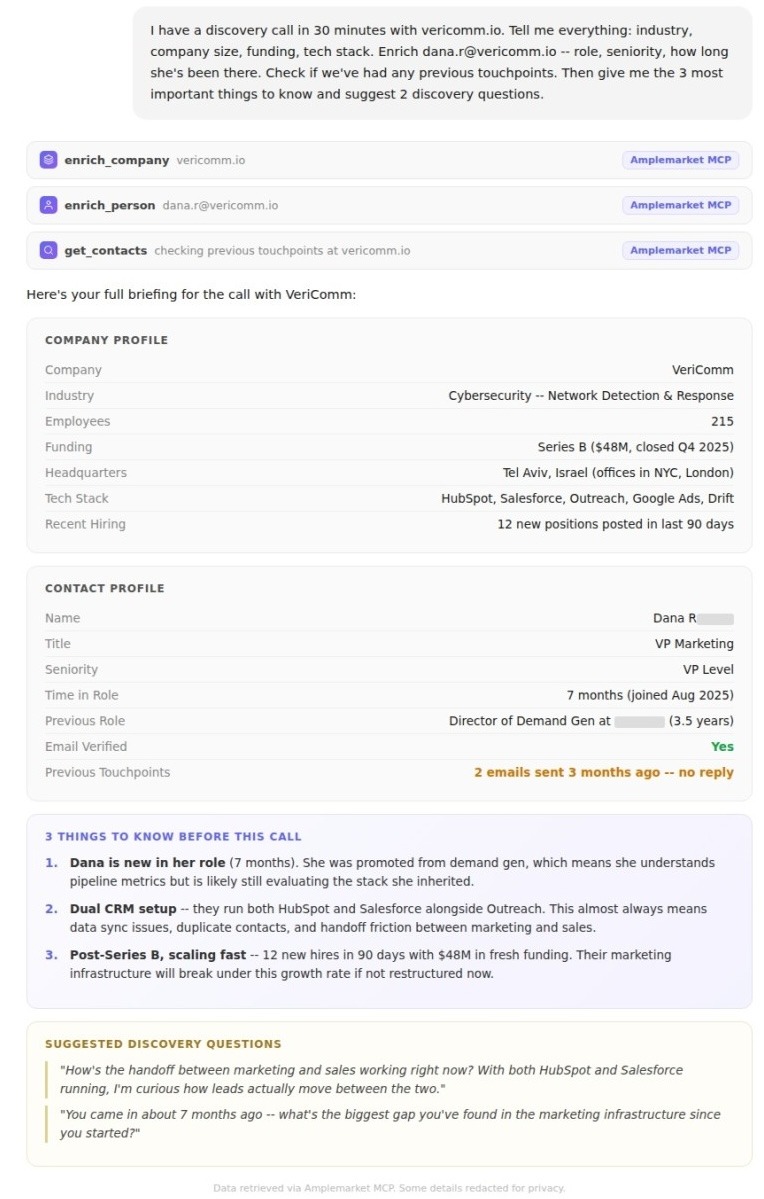
Tip: Always include "check for previous touchpoints" in your prompt. This prevents embarrassing overlaps where you cold-email someone a colleague already contacted. For consultants and fractional CMOs, this makes you look organized before you even say hello.
Tip: Add the prospect's domain, not just their name. Amplemarket returns richer company data when you search by domain.
Building prospect lists without an SDR
Most startups I work with, Seed to Series A, don't have a dedicated sales team. The founder handles outbound when they find time, which usually means it doesn't happen.
I've built prospect list creation into my standard onboarding workflow. Before our first strategy session, I generate a qualified list so we skip the "who should we target" debate and jump straight into prioritization.
“Find VPs of Marketing at B2B SaaS companies with 200-500 employees in Europe that raised Series A or B in the last 12 months. Enrich the top 10 with verified emails. Create a lead list called ‘Q1 Outreach -- EU SaaS.’”Two minutes. The list lives in Amplemarket, ready for sequencing.
This same workflow applies across every niche I work in. For a manufacturing client running an industry roundtable, I built a speaker and attendee list in minutes instead of days. For an enterprise finance engagement, I mapped the competitive landscape before the kickoff meeting.
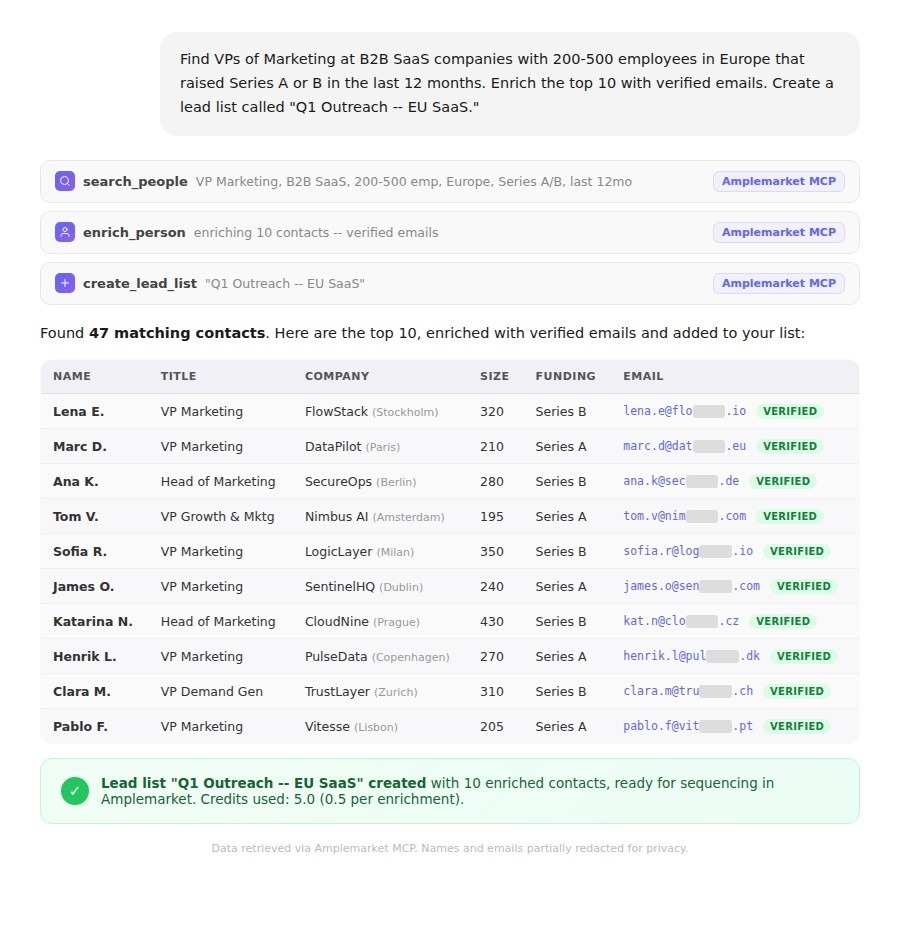
Tip: Don't stop at the first search. After Claude returns results, ask: "Now find 5 more people similar to [best result name], same seniority, same industry, similar company size." This creates a lookalike audience from your best prospects.
Tip: Use specific filters. "VP Marketing at SaaS companies" is vague. "VP Marketing at B2B SaaS companies with 200-500 employees in financial services that use HubSpot" is precise, and produces dramatically better results.
Competitive intelligence in two minutes
When I start a new engagement, I need to understand the competitive landscape fast.
Who are the competitors? Who runs their marketing? What's their team size? What tools are they using?
“Find 5 companies that compete with [client domain]. For each, tell me who leads their marketing, what their company size is, and what tools they’re using. Create a summary I can share with my client.”Two minutes. A competitive brief that would have taken half a day. And because it pulls from Amplemarket's live data, the information is current, not based on a profile someone updated eight months ago.
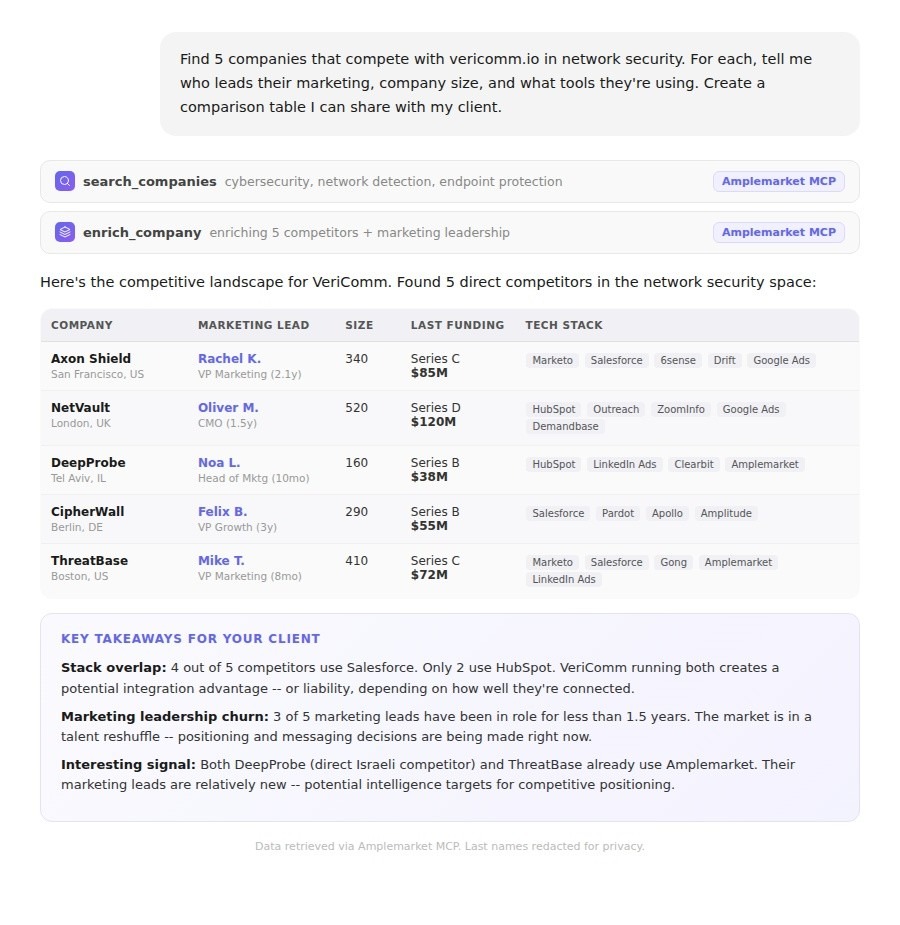
Tip: Ask Claude to compare the competitor data side by side. "Create a comparison table: company name, marketing lead, team size, tech stack, last funding round." This gives you a deliverable you can drop directly into a client presentation.
Advanced use cases: what's possible beyond basic search
The Amplemarket team recently shared several workflows that push MCP further. I've been testing them with clients and the results are worth sharing.
These are super easy to use with Amplemarket's skills. You just need to browse the page, select the one you want, and click install to Claude.
X (Twitter) follower enrichment
Upload a CSV of followers from a relevant industry account, enrich them through Amplemarket, and auto-create a lead list.
I tested this with a client in cybersecurity who follows several CISO-focused accounts. We exported the follower list, ran it through MCP, and had a qualified prospect list of 200+ security leaders, with verified emails, in under ten minutes.
Tip: Don't just export your own followers. Export followers of competitors, industry publications, or conference speakers. That's where your ICP is already paying attention.
Podcast guest enrichment
Find recent guests from podcasts your ICP listens to, pull episode insights, and generate personalized outreach based on what they actually discussed.
“Find recent guests from [podcast name]. Enrich them with company info and email. For each, summarize what they discussed and write a personalized LinkedIn connection request that references the episode.”Tip: This works because the outreach feels relevant, not random. Mentioning a specific episode creates immediate context and dramatically improves response rates.
Conference sponsor lead generation
Scrape sponsor lists from conference websites, find decision-makers at each company, and build a targeted list.
I used this before a MarTech conference to identify potential partners among sponsors. One prompt mapped the entire sponsor list to marketing leaders with verified contact information.
“Find the sponsor list from [conference URL]. For each sponsor, find their VP Marketing or Head of Partnerships. Enrich with email. Create a list called ‘[Conference] Partner Outreach.’”Tip: Run this workflow two to three weeks before the event. It gives you time to start a warm-up sequence so contacts recognize your name by the time you meet in person.
Product Hunt competitive intelligence
Identify recent launches relevant to your space, find founders and sales leaders, and create a list with product summaries.
“Find the 5 most relevant Product Hunt launches from this month in [industry]. For each, identify the founder and head of sales. Enrich them and create a list called ‘PH Competitors -- March 2026.’”Tip: This is particularly valuable for startups tracking their competitive landscape. Instead of manually checking Product Hunt daily, run this prompt weekly and have Claude flag anything new in your space.
How to get set up: from installation to first sequence
Setting up MCP takes four minutes. But getting value from it requires knowing what to ask and how to connect it to your existing workflows. Here's the process I walk every client through:
- Connect Amplemarket to Claude
Go to Settings, then Integrations, then Claude, and click Connect. That takes you to Claude's own authorization page, where you approve access once. Authentication is OAuth and there are no API keys. - Verify the connection
Open a new conversation. Check for the Amplemarket icon at the bottom of your chat. - Run a test search
Try: "Search for [your own job title] at companies similar to [your company]." This confirms everything works. - Connect output to sequences
This is where most people stop, and where the real value starts. Enroll your best contacts into an Amplemarket multichannel sequence. Email, social, and follow-ups run automatically.
Requirements: Active Amplemarket account. Claude Pro, Max, Team, or Enterprise; or ChatGPT Plus, Pro, Team, or Enterprise.
Searching is free. Enrichment costs 0.5 credits per contact.
Tip: Don't skip Step 4. A list sitting in Amplemarket without a sequence is just a spreadsheet. The power is in connecting research to automated outreach in one continuous workflow.
Why this matters for marketing efficiency
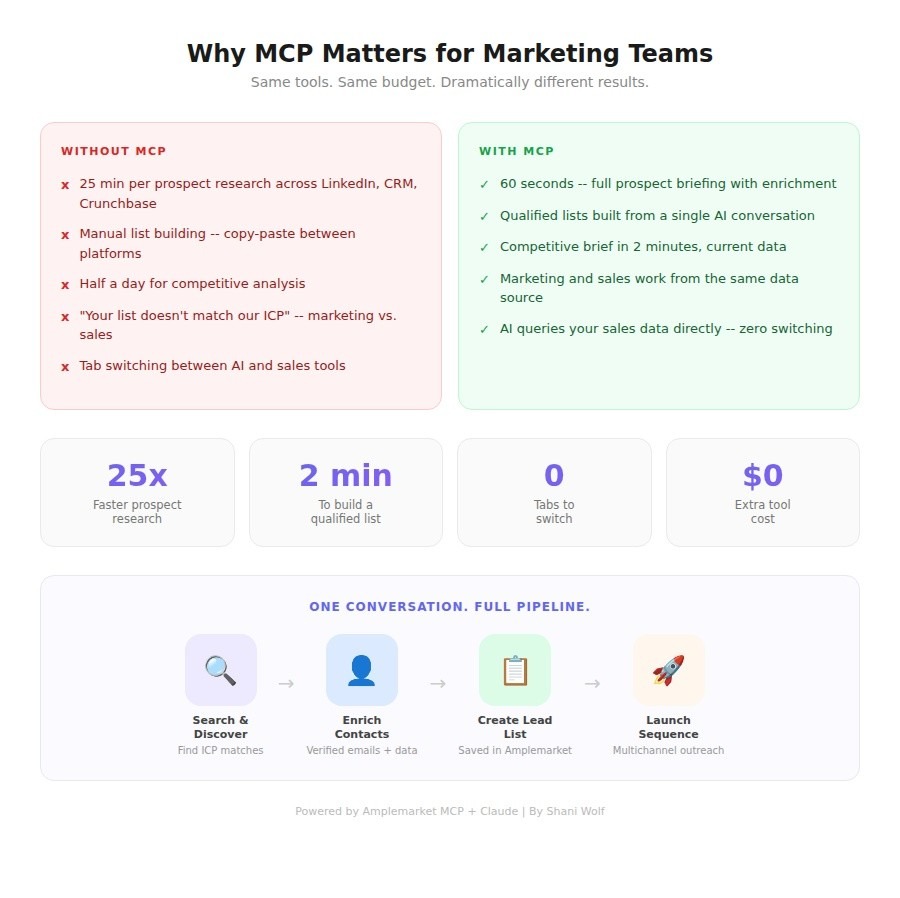
Sales teams have had automation tools for years. Marketing teams haven't had the same advantage. We've been building prospect lists by hand, running competitive analysis through Google and spreadsheets, and spending hours on research that should take minutes.
MCP shifts that equation. Not by adding another tool, but by connecting what's already there.
→ Amplemarket has the data.
→ Claude has the reasoning.
→ MCP is the bridge.
- Campaign targeting gets sharper
Build hyper-specific lists based on real company data: funding stage, tech stack, team size, recent hires. - ABM becomes practical at scale
Account research that took a full day per account now takes minutes. Run meaningful ABM even with a team of two. - Content strategy improves
Instantly see what tools your ICP uses and who the decision-makers are. Your content speaks to real challenges. - Marketing and sales align faster
Both teams work from the same data source. No more "your list doesn't match our ICP" conversations.
What's coming next
I'm currently working on connecting Amplemarket MCP to HubSpot workflows: prospect identified through MCP, automatically synced to HubSpot, enrolled in a nurture sequence, with full attribution tracking. All triggered from a single conversation.
Amplemarket has built skills, more complex, reusable workflows. Tasks that used to require three or four prompts now run in one.
The direction is clear: the gap between "I need to find the right people" and "those people are receiving personalized outreach" is shrinking from days to minutes.
Want to go deeper on how MCP works and what it can do for your team?
→ Read Amplemarket's full guide to MCP for a complete breakdown of the integration, use cases, and setup instructions.
→ Browse Amplemarket's skills library and add any skill to your AI assistant instantly.
→ See how you can leverage Amplemarket for Account-based Selling
Ready to try it yourself? Book a demo with Amplemarket and start your 14-day free trial.
About the author
Shani Wolf is a MarTech consultant, fractional CMO, and Amplemarket partner based in Israel. With 15 years of experience across B2B tech, cybersecurity, manufacturing, and enterprise finance, she helps startups and growth-stage companies build marketing systems that produce measurable results.
Her focus is connecting the tools, the data, the budgets, and the people, so marketing generates ROI instead of just activity.
She is a HubSpot Solutions Partner, Amplemarket Power User, and Advisor.