Published
You know the loop.
Open your account list.
Pick a company.
Search for the right contact by product line.
Cross-check against everyone you have already reached out to.
Route them into the right list based on language or region.
Repeat 20 times.
It works, but it eats an hour of your morning before you have talked to a single prospect.
What if you could compress that entire routine into 90 seconds, every single day, without sacrificing the judgment that makes your outreach actually land?
That is what this guide is for.
It walks you through exactly how to build an AI agent for sales lead sourcing using Claude and Amplemarket's MCP integration, so the mechanical parts of prospecting become invisible and you can spend your time where it matters: in conversation.
But first, let's start with understanding the basics.
What is an AI sales agent?
An AI sales agent is software that autonomously performs sales tasks such as lead sourcing, data enrichment, outreach sequencing, and follow-up on behalf of a human seller. Unlike a simple chatbot, an AI sales agent connects to real tools and databases, executes multi-step workflows, and makes decisions based on rules you define.
Sopro's research showed that over 80% of sales teams using AI report increased revenue, not only saving time but also directly contributing to growth.
What is MCP (Model Context Protocol)?
MCP, or Model Context Protocol, is an open standard developed by Anthropic that allows AI assistants like Claude to connect securely to external tools and data sources.
Instead of copying data between tabs, MCP lets your AI assistant call tools directly: searching for prospects, pulling up lead lists, and adding contacts, all inside the conversation.
Think of it as giving your AI assistant hands: it can reach into Amplemarket, execute actions, and return results without you leaving the chat window.
How do you build an AI agent for lead sourcing?
You build an AI lead sourcing agent by connecting an AI assistant like Claude to your sales platform via MCP, then writing a prompt that encodes your persona logic, product mapping, list routing rules, and deduplication checks. The agent processes your target accounts automatically and returns a structured summary of every contact added.
Can sound complicated, but in the rest of this guide, I'll be breaking down the exact process, step by step.
Why lead sourcing is the perfect candidate for AI automation
Every time I adopt a new AI tool, I start from the same place.
I look at what I am already doing manually, repeatedly, at some point every week, and I ask one question: can I do this faster with AI?
Not replace the judgment, not hand over the thinking: just compress the time it takes to do the routine work so I can spend more of my day on the part that actually matters.
For me, lead sourcing was the obvious candidate.
The rules are knowable, the output is predictable, the steps are the same every morning. That is exactly the profile of work that AI handles well.
So I built an agent.
Here is how it works and how you can build one for your own product.
What the agent actually does
The agent runs inside Claude, connected to Amplemarket via its MCP integration, which lets Claude call Amplemarket's tools directly as if it had hands.
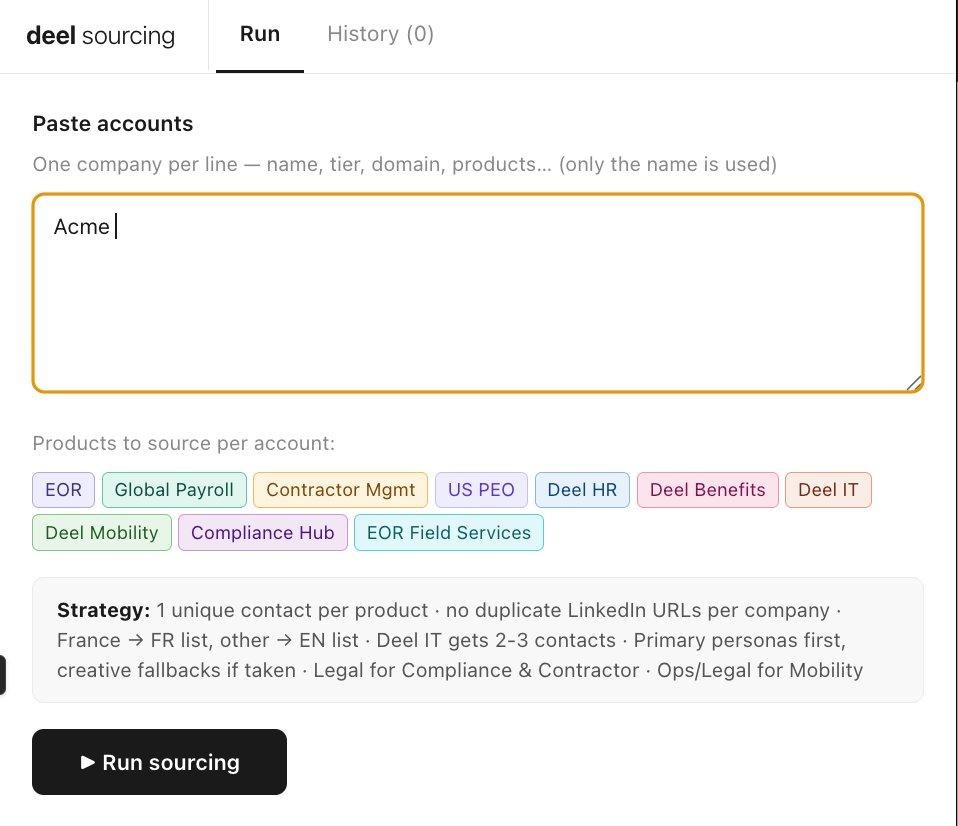
Each morning, I paste in a list of target accounts. The agent takes it from there:
- For each account, it searches for the right contact by product line - not just the obvious buyer, but also the secondary personas who often turn out to be the real decision-makers.
- It checks that no LinkedIn URL has been used twice, so we never reach out to the same person from the same account twice in the same run.
- It detects whether the company is French or English-speaking and routes contacts to the correct Amplemarket list automatically.
- It fills one contact per product first - then loops back to add 2–3 contacts on the priority product to maximise multi-threading.
When it finishes, it drops a summary table in the chat: company, product, name, title, list added to. The whole thing takes maybe 90 seconds instead of the better part of an hour.
Why your sourcing agent must be unique to you
This is the part I want to stress, because I have seen people try to copy sourcing workflows from someone else's company and wonder why the results are mediocre.
A sourcing agent is only as good as the persona logic you build into it.
My agent works well because it reflects exactly how I think about my accounts: which products map to which titles, which secondary personas are underrated, which product needs extra contacts because it is multi-stakeholder by nature.
That logic took me months to develop as a seller, and the agent just executes it at speed.
The truth is that if you built the same agent with a generic persona map, you would get generic results.
So the real work is not the technical setup.
It is thinking clearly about four things before you write a single line of prompt.
- What products you sell and who actually buys each one.
Map every product to the specific titles that purchase or champion it, not just the VP-level obvious answer.
- Who else, beyond the obvious title, could be the champion or the blocker.
Secondary personas are often underrated. A sourcing agent that only targets the primary buyer misses half the opportunity.
- How you segment your outreach.
Region, language, tier, deal size; whatever your segmentation logic is, your routing rules need to reflect it precisely.
- Which product or segment is worth multi-threading, and how many contacts per account is the right number.
Not every product needs three contacts. Some need one. Your agent should know the difference.
Get that thinking right first.
The prompt almost writes itself once you do.
How to set up Amplemarket's MCP integration with Claude
Before the prompt itself, one prerequisite: you need to connect Amplemarket's MCP server to Claude.
MCP is what allows Claude to call Amplemarket's tools directly: searching for people, fetching lead lists, adding contacts.
All without you having to copy and paste anything.
You can find more information on how to set it up via Amplemarket here: Run outbound in Claude and ChatGPT with Amplemarket
Once that is connected, open a new Claude conversation, paste the prompt below, and you are ready to run.
The complete prompt framework (copy and customize)
Below is the exact prompt structure I use.
The magic is in how you fill in the brackets: your product knowledge, your ICP instincts, your routing logic.
That is what turns a generic prompt into something that actually works.
You are a lead sourcing agent for [Your Company].
You have access to Amplemarket via MCP. Use these tools:
  • search_people — find contacts by title, company, location
  • list_lead_lists — retrieve available outreach lists
  • add_leads_to_lead_list — add a contact to the correct list
PRODUCTS TO SOURCE:
[Product 1], [Product 2], [Product 3]...
PERSONA MAP:
For each product, try titles in order. Move to the next only if the
previous is already taken by another contact at that company.
[Product 1] → 1st: [Primary title]  2nd: [Secondary title]  3rd: [Creative title]
[Product 2] → 1st: [Primary title]  2nd: [Secondary title]
[Product 3] → 1st: [Primary title]  2nd: [Secondary title]  3rd: [Creative title]
LIST ROUTING:
Detect the company's country from search results.
  • [Country / Region A] → add to: [List A name]
  • All others → add to: [List B name]
RULES:
1. Process one product at a time per company.
2. Never reuse the same LinkedIn URL twice in a session.
3. Target companies with [X]+ employees only.
4. First pass: find 1 contact per product across all accounts.
   Second pass: go back and find 2–3 contacts for [Priority product].
5. If a title is already used for a company, cascade to the next
   persona in the map — never skip to a different product.
6. If no strong match exists for a product at a company, log it
   as NOT FOUND and move on. Never add a weak fit.
OUTPUT:
When all accounts are processed, return a summary table:
Company | Product | Name | Title | List added to | Status
Status = ADDED or NOT FOUND.
When I paste a list of accounts below, begin immediately.
How to customize the prompt for your workflow
The framework above is a skeleton, that works for me.
Here is how to make it yours:
- Start with your persona map
I'd say this is the single most important piece.
For each product, list three to five titles in priority order. The agent will try the first title, and only cascade to the next if that slot is already taken by another contact at the same company.
- Define your routing logic
If you segment by language, region, or deal tier, add a routing rule for each segment. The agent will detect the company's country from the search results and route automatically in Amplemarket.
- Set your multi-threading rules
Decide which products deserve more than one contact per account. For high-stakes, multi-stakeholder products, two to three contacts is usually the right number. For simpler products, one should be enough.
- Add guardrails
The "never add a weak fit" rule is critical. Without it, the agent will pad your lists with marginal contacts that dilute your outreach quality.
What results to expect
When the agent finishes a run, it returns a clean summary table showing every account, the product sourced, the contact added, their title, which list they were routed to, and whether the status is ADDED or NOT FOUND.
A typical morning run across 20 accounts takes about 90 seconds. The same work done manually takes 45 to 60 minutes.
That is not a small efficiency gain.
That is an hour back in your day, every day, to spend on conversations, strategy, and the judgment calls that AI cannot make.
The broader principle: find your 90-second opportunity
I am not trying to automate my job. I am trying to make the mechanical parts of it invisible so I can put more energy into the creative parts.
Sourcing is mechanical, the rules are knowable, the output is predictable: that is exactly the profile of work that AI handles well.
When you look at your week through that lens, not "what can AI do?" but "what am I doing manually that follows a knowable set of rules?", the opportunities become obvious fast.
What is the repetitive thing in your workflow that you have not automated yet?
That is where I would start.
Build your own AI sourcing agent with Amplemarket MCP
Want more plays?
Check out my other blog post on how I went from doing all personalization by hand to turning every research workflow into an automated AI Snippet inside Amplemarket.
I share outbound tactics, AI workflows, and my real sequences weekly.
→ Follow me on LinkedIn (Jonathan Molina)
Further reading
- Amplemarket MCP: run outbound within ChatGPT and Claude
- Best AI lead generation tools for B2B sales
- Best AI sales engagement platforms 2026
- Browse Amplemarket's skills the library and instruct Claude and ChatGPT how to handle specific sales tasks using Amplemarket data, with one click.